

In competitive games like Valorant and Counter-Strike 2, milliseconds can make the difference between winning and losing a firefight. When you press A to strafe left and then D to move right, a traditional mechanical keyboard may not register the second input until the first key travels back past its reset point. That small delay can affect how quickly you change direction and react to opponents.
Modern gaming keyboards are addressing this problem with technologies such as Hall effect magnetic switches, Rapid Trigger, and advanced SOCD handling. At the same time, manufacturers are adding dedicated macro keys, customizable displays, wireless connectivity, and integrated streaming controls.
But not every gamer needs the same features. Some keyboards prioritize competitive performance, while others focus on productivity, customization, or streaming convenience.
We tested and compared five gaming keyboards worth considering in 2026, ranging from approximately $130 to $350. Here’s what makes each model stand out and which one is best suited to your gaming setup.
What Makes a Gaming Keyboard Different From a Regular Keyboard?
A gaming keyboard is designed to deliver faster, more precise, and more customizable input than a conventional keyboard. Several specifications and technologies determine how well it performs.
Mechanical vs. Hall Effect Magnetic Switches
Traditional mechanical keyboards use physical switches that activate at a predetermined actuation point. Once a key reaches that point, the keyboard registers the input.
Hall effect keyboards use magnetic sensors to measure the precise position of each key. This allows users to customize actuation depth and adjust how sensitive individual keys are.
With adjustable actuation, you can make frequently used gaming keys register with a very light touch while keeping other keys less sensitive to accidental presses.
Rapid Trigger
Rapid Trigger is one of the most important features for competitive FPS players.
On traditional mechanical keyboards, a key generally needs to travel back to a fixed reset point before it can register another input. Rapid Trigger dynamically adjusts the reset point based on the key’s movement.
This allows a key to reset almost immediately when you begin releasing it, making repeated inputs and direction changes faster.
Rapid Trigger is primarily associated with Hall effect magnetic keyboards.
SOCD Handling and Snap Tap
SOCD stands for Simultaneous Opposing Cardinal Directions. It describes situations where a keyboard receives two opposing directional inputs at the same time, such as A and D.
Different manufacturers have introduced their own implementations:
- Razer Snap Tap: Prioritizes the most recently pressed key.
- Corsair FlashTap: Provides configurable handling of opposing directional inputs.
- Logitech Key Priority: Offers similar input-priority functionality.
These features can improve responsiveness in certain games, but their use may be restricted by individual game policies and competitive tournament rules.
Polling Rate
Polling rate measures how frequently a keyboard reports its input state to the computer.
| Polling rate | Report interval |
|---|---|
| 1,000Hz | 1 millisecond |
| 8,000Hz | 0.125 milliseconds |
An 8,000Hz polling rate reduces the reporting interval significantly. However, the practical benefits depend on your entire gaming setup, including your PC’s performance, monitor refresh rate, and the game itself.
A higher polling rate is not automatically better for every player.
Which Gaming Keyboard Should You Buy?
Before comparing individual models, consider the type of games you play and the features that will make the biggest difference.
- Competitive FPS games: Look for Hall effect switches, adjustable actuation, and Rapid Trigger.
- MMOs and strategy games: Dedicated macro keys and customizable shortcuts can be more valuable than extremely high polling rates.
- Streaming and content creation: Integrated LCD keys, programmable dials, and Stream Deck functionality can replace additional accessories.
- Multiple devices and wireless setups: Bluetooth switching and 2.4GHz wireless connectivity are useful for gaming across a desktop, laptop, and tablet.
5 Best Gaming Keyboards to Buy in 2026
The following keyboards were compared based on their pricing, switch technology, polling rate, layout, connectivity, and distinctive features.
Prices reflect the manufacturers’ announced or listed pricing as of October 2026. Retailers such as Amazon may offer lower prices through discounts and promotions.
1. Logitech G PRO X2 RAPID: Best for Competitive FPS Gaming
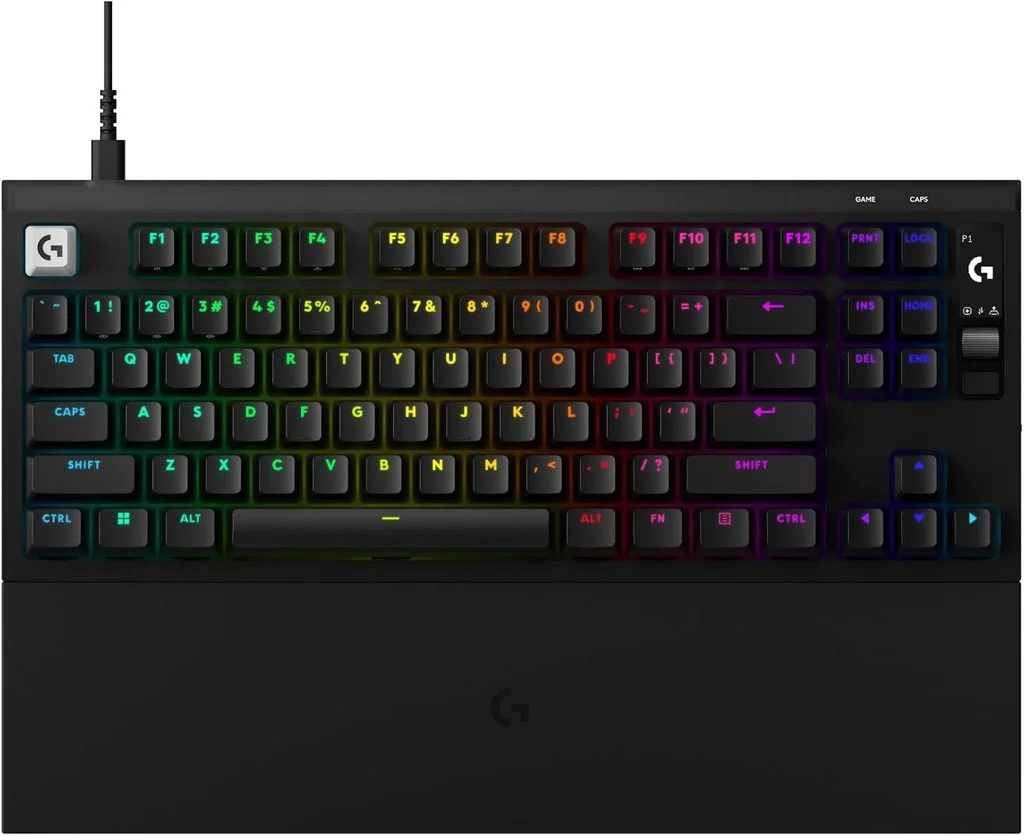
The Logitech G PRO X2 RAPID is designed for competitive gamers who want precise input control, fast actuation, and customizable settings without constantly opening software.
Released on September 23, 2026, this keyboard features Logitech’s custom KS-20 magnetic analog switches, offering adjustable actuation from 0.1mm to 4mm in 0.05mm increments.
That level of precision gives players considerable flexibility when configuring individual keys for different games.
Key Features
- Hall effect magnetic analog switches
- Adjustable actuation from 0.1mm to 4mm
- Rapid Trigger and Key Priority (SOCD)
- 8,000Hz key scanning and USB polling
- Hot-swappable magnetic switches
- Integrated OLED display and rotary control
- Doubleshot PBT keycaps
- Six layers of internal sound dampening
- Screw-in stabilizers for Space, Enter, and Shift
- XL silicone palm rest included
One of its biggest advantages is the integrated OLED screen and rotary control located in the upper-right corner.
Players can adjust actuation, Rapid Trigger, Key Priority, lighting, and polling rate directly on the keyboard. This is particularly useful when playing on tournament or LAN computers where installing Logitech G HUB may not be possible.
The hot-swappable magnetic switches are another advantage, as this feature remains relatively uncommon among analog gaming keyboards.
Downsides
The keyboard costs more than its predecessor, with a launch price of $229.99 compared with the previous model’s $169.99 launch price.
It is also wired only. Although basic adjustments are available directly on the device, saving profiles and accessing advanced customization still require Logitech G HUB.
Best for: Competitive FPS players who need precise controls and frequently switch between gaming PCs.
Logitech G PRO X2 Rapid Wired Gaming Keyboard – Black
Built for competitive gaming, the Logitech G PRO X2 Rapid combines magnetic analog switches with Rapid Trigger technology for responsive, precise input. Its 8 kHz polling rate, integrated OLED display, and detachable USB-C connection deliver a performance-focused setup, while the included palm rest adds comfort during extended sessions.
- Magnetic analog switches
- Rapid Trigger for responsive actuation
- 8 kHz polling rate
- Integrated OLED display
- Wired connection for competitive gaming
- Detachable USB-C cable
- Included palm rest
- Black finish
Tech2Geek participates in the Amazon Associates Program. As an Amazon Associate, we earn from qualifying purchases at no additional cost to you.
2. Razer BlackWidow V4 X: Best Budget Gaming Keyboard

The Razer BlackWidow V4 X is an excellent choice for gamers who want a full-size mechanical keyboard without spending more than $200.
Unlike the analog keyboards in this comparison, the BlackWidow V4 X focuses on traditional mechanical switches and additional controls designed for MMO players, strategy games, and everyday gaming.
Key Features
- Full-size mechanical keyboard layout
- Six dedicated macro keys on the left side
- Razer Yellow linear switches or Green clicky switches
- Multi-function roller and media controls
- Per-key Chroma RGB lighting
- Internal sound-dampening foam
- Snap Tap support through Razer Synapse 4
The six dedicated macro keys are particularly useful for MMO players who rely on complex ability rotations, shortcuts, or customizable commands.
Having these keys positioned along the left side allows players to access macros without remapping frequently used movement keys.
The Yellow linear switches provide a quieter and smoother typing experience compared with the clicky Green switches. This makes them a better choice for gamers who share a room or prefer less keyboard noise.
Razer has also introduced Snap Tap support through Synapse 4. However, the feature is disabled by default and must be activated through the software.
Downsides
The BlackWidow V4 X has a maximum polling rate of 1,000Hz, which is lower than the 8,000Hz offered by some competing models.
It also uses doubleshot ABS keycaps instead of PBT and does not include a wrist rest. Razer reserves that accessory for the more expensive BlackWidow V4.
Despite these compromises, its pricing makes it particularly attractive.
Price: $129.99 MSRP, with Amazon discounts sometimes bringing it down to approximately $99.99.
Best for: MMO and strategy gamers looking for dedicated macro keys at an affordable price.
Razer BlackWidow V4 X Mechanical Gaming Keyboard – Yellow Switches, Black
Enjoy fast, quiet keystrokes and customizable gaming controls with the Razer BlackWidow V4 X. Its linear, silent Yellow switches are designed for smooth typing, while six dedicated macro keys, Chroma RGB lighting, and convenient media controls make it a versatile choice for gaming and everyday productivity.
- Razer Yellow linear and silent mechanical switches
- 6 dedicated macro keys for customizable commands
- Razer Chroma RGB lighting
- Doubleshot ABS keycaps
- Roller and dedicated media controls
- Snap Tap support for responsive inputs
- Smooth, quiet keystrokes for gaming and typing
- Black finish
Tech2Geek participates in the Amazon Associates Program. As an Amazon Associate, we earn from qualifying purchases at no additional cost to you.
3. SteelSeries Apex Pro TKL Gen 3: Best for Preventing Accidental Keypresses

Image credit: Amazon
The SteelSeries Apex Pro TKL Gen 3 is another Hall effect gaming keyboard designed for competitive players. It combines adjustable actuation, Rapid Trigger, and advanced input customization with features intended to reduce accidental keypresses.
Its OmniPoint 3.0 magnetic switches support adjustable actuation from 0.1mm to 4mm across 40 levels.
Key Features
- OmniPoint 3.0 Hall effect magnetic switches
- Adjustable actuation from 0.1mm to 4mm
- Rapid Trigger
- Rapid Tap for SOCD handling
- Protection Mode
- OLED display for profiles and settings
- GG QuickSet game-specific presets
- Aluminum top plate
- PBT keycaps
- Magnetic wrist rest
The most distinctive feature is Protection Mode.
When you press a key, Protection Mode reduces the sensitivity of surrounding keys. This helps prevent accidental inputs when using extremely shallow actuation settings.
For example, players who configure movement keys to activate with minimal pressure may occasionally trigger neighboring keys unintentionally. Protection Mode is designed to help minimize this problem.
SteelSeries GG QuickSet also provides game-specific presets, making it easier to configure settings for different titles without starting from scratch.
Downsides
The main limitation is its polling rate.
While Logitech and Corsair offer 8,000Hz polling on their respective keyboards, the Apex Pro TKL Gen 3 operates at 1,000Hz according to reviews from RTINGS and other testing sources.
RTINGS has also reported actuation accuracy concerns compared with the previous 2023 generation, although firmware improvements may address some of these issues.
The wireless version, the Apex Pro TKL Wireless Gen 3, is available with a listed price of $269.99.
Price: $219.99 for the wired version.
Best for: Competitive FPS players who want adjustable analog switches and additional protection against accidental inputs.
SteelSeries Apex Pro TKL Gen 3 Gaming Keyboard – Black
Built for competitive play, the SteelSeries Apex Pro TKL Gen 3 features OmniPoint 3.0 analog magnetic switches with adjustable actuation and Rapid Trigger for ultra-responsive inputs. Rapid Tap/SOCD support, Protection Mode, and an integrated OLED display add advanced control, while RGB lighting and durable PBT keycaps complete this premium tenkeyless setup.
- OmniPoint 3.0 analog magnetic switches
- Adjustable actuation and Rapid Trigger
- Rapid Tap and SOCD support
- Protection Mode for input management
- Integrated OLED display
- Customizable RGB lighting
- Durable PBT keycaps
- Tenkeyless (TKL) compact layout
- USB-C connectivity
- Black finish
Tech2Geek participates in the Amazon Associates Program. As an Amazon Associate, we earn from qualifying purchases at no additional cost to you.
4. ASUS ROG Strix Scope II 96 Wireless: Best Wireless Gaming Keyboard

The ASUS ROG Strix Scope II 96 Wireless is the most versatile keyboard in this comparison for gamers who need wireless connectivity and a compact layout without sacrificing the number pad.
Its 96% layout retains almost all the keys found on a traditional full-size keyboard while occupying less desk space.
Key Features
- Compact 96% layout with dedicated number pad
- Wired USB connectivity
- 2.4GHz wireless through ROG SpeedNova
- Bluetooth connectivity for up to three devices
- ROG Omni Receiver support
- Pre-lubed ROG NX Snow linear switches
- Hot-swappable mechanical switches
- Doubleshot PBT keycaps
- Internal sound-dampening foam and switch pads
- Up to 1,500 hours of battery life with RGB disabled
The keyboard supports three connection methods: wired USB, 2.4GHz wireless, and Bluetooth.
Bluetooth makes it convenient to connect to multiple devices, while the 2.4GHz connection is better suited to gaming when low latency matters.
Another useful feature is the ROG Omni Receiver, which can connect compatible ASUS ROG mice and headsets alongside the keyboard. This helps reduce the number of USB ports required for a gaming setup.
The keyboard also uses pre-lubed mechanical switches and includes several layers of sound dampening to improve its typing experience.
Downsides
The Strix Scope II 96 Wireless was originally released in 2023, making it the oldest design in this comparison.
It also uses traditional mechanical switches rather than Hall effect technology, meaning it does not support Rapid Trigger or adjustable analog actuation.
Its list price varies between approximately $179.99 and $209.99, depending on the retailer, but Amazon discounts have brought it down to around $129.
Best for: Gamers who want a single wireless keyboard for a desktop PC, laptop, and tablet.
ASUS ROG Strix Scope II 96 Wireless Mechanical Gaming Keyboard
Get a near-full-size keyboard in a more compact layout with the ASUS ROG Strix Scope II 96 Wireless. Its 96% design keeps a dedicated number pad while saving desk space, and the pre-lubed ROG NX Snow linear switches deliver smooth, responsive keystrokes. Hot-swappable switches, tri-mode connectivity, and customizable RGB lighting make it a versatile choice for gaming and everyday use.
- Compact 96% full-size layout with number pad
- Tri-mode connectivity for flexible device connections
- Pre-lubed ROG NX Snow linear mechanical switches
- Hot-swappable switch design
- Durable PBT keycaps
- Customizable RGB lighting
- Compatible with PC and Mac
- Black finish
Tech2Geek participates in the Amazon Associates Program. As an Amazon Associate, we earn from qualifying purchases at no additional cost to you.
5. Corsair Galleon 100 SD: Best Gaming Keyboard for Streamers

The Corsair Galleon 100 SD takes a completely different approach to gaming keyboard design.
Instead of simply adding more gaming features, Corsair has integrated a full Elgato Stream Deck directly into the keyboard.
Released on January 29, 2026, following recognition at CES 2026, the Galleon 100 SD combines a mechanical gaming keyboard with dedicated streaming controls, customizable LCD keys, and a built-in display.
Integrated Stream Deck Controls
The Stream Deck section includes:
- 12 customizable LCD keys
- A 5-inch color display
- Two programmable push-down dials
- Stream Deck software integration
- Access to Elgato Marketplace plugins
These controls can be configured to perform a wide range of tasks, including switching streaming scenes, muting Discord, controlling Spotify, launching applications, and triggering shortcuts.
For streamers, this can eliminate the need to purchase a separate Stream Deck device and keep essential controls within easy reach.
Gaming Performance
The keyboard itself is equipped with several features designed for competitive gaming.
- Pre-lubed Corsair MLX Pulse linear switches
- 45g actuation force and 2.0mm actuation distance
- Hot-swappable sockets supporting 3-pin and 5-pin switches
- 8,000Hz polling rate
- FlashTap SOCD support
- Gasket-mounted design
- Six layers of internal sound dampening
- Magnetic memory foam wrist rest
- USB passthrough
The hot-swappable switches are especially useful for enthusiasts who want to customize the typing experience without replacing the entire keyboard.
The integration of Stream Deck controls also makes it useful beyond gaming, particularly for video editing, productivity, and content creation.
Downsides
At $349.99, the Galleon 100 SD is the most expensive keyboard in this comparison.
It is also wired only, and its software setup requires two applications: Corsair Web Hub for keyboard customization and Stream Deck software for the integrated controls.
Reviewers have also noted that the LCD keys can attract fingerprints, which may require regular cleaning.
Best for: Streamers and content creators who want gaming performance and Stream Deck functionality in a single device.
Corsair Galleon 100 SD RGB Mechanical Wired Gaming Keyboard – Black
Combine competitive gaming controls and customizable shortcuts in one setup with the Corsair Galleon 100 SD. This wired mechanical keyboard integrates Stream Deck functionality, giving you quick access to commands, apps, and workflows without needing a separate control device. Pre-lubed MLX Pulse Thocky switches, hot-swappable support, and an 8,000Hz polling rate round out its performance-focused design.
- Integrated Stream Deck controls
- Pre-lubed MLX Pulse Thocky mechanical switches
- SOCD and FlashTap support
- Hot-swappable switch design
- Double-shot PBT keycaps
- Up to 8,000Hz polling rate
- Customizable RGB lighting
- Wired USB connection
- US QWERTY layout
- Black finish
Tech2Geek participates in the Amazon Associates Program. As an Amazon Associate, we earn from qualifying purchases at no additional cost to you.
Gaming Keyboard Comparison: Which One Offers the Best Value?
Here’s a side-by-side comparison of the five keyboards and their most important specifications.
| Keyboard | Switch type | Polling rate | Layout | Best feature |
|---|---|---|---|---|
| Logitech G PRO X2 RAPID | Hall effect | 8,000Hz | TKL | Adjustable actuation and OLED controls |
| Razer BlackWidow V4 X | Mechanical | 1,000Hz | Full-size | Six dedicated macro keys |
| SteelSeries Apex Pro TKL Gen 3 | Hall effect | 1,000Hz | TKL | Protection Mode |
| ASUS ROG Strix Scope II 96 Wireless | Mechanical | Up to 1,000Hz | 96% | Tri-mode wireless connectivity |
| Corsair Galleon 100 SD | Mechanical | 8,000Hz | Full-size with Stream Deck | Integrated LCD keys and display |
Final Verdict: Which Gaming Keyboard Should You Buy?
The best gaming keyboard depends on what you actually need from your setup.
The Logitech G PRO X2 RAPID is an excellent choice for competitive FPS players who want fast analog input, adjustable actuation, and on-device controls. Its 8,000Hz polling rate and magnetic switches make it particularly appealing for players who frequently switch between gaming PCs.
The SteelSeries Apex Pro TKL Gen 3 is worth considering if accidental keypresses are a concern. Its Protection Mode and adjustable analog switches provide a useful combination of responsiveness and control.
For MMO and strategy gamers on a budget, the Razer BlackWidow V4 X offers six dedicated macro keys and a full-size layout at a considerably lower price.
The ASUS ROG Strix Scope II 96 Wireless is the best option for users who want wireless connectivity and a compact layout without giving up the number pad. Its ability to connect to multiple devices makes it especially versatile.
Finally, the Corsair Galleon 100 SD is designed for streamers and content creators who want a keyboard and Stream Deck combined into one device. Its price is high, but the integrated controls can eliminate the need for separate streaming hardware.
Ultimately, choose a keyboard based on the games you play, your budget, and the features you will actually use. A higher polling rate or more advanced switch technology does not automatically make a keyboard the best choice for everyone.
Frequently Asked Questions
Is an 8,000Hz gaming keyboard worth the money?
An 8,000Hz polling rate reduces the input reporting interval from 1 millisecond to 0.125 milliseconds. This can be useful for competitive players seeking the lowest possible latency.
However, the practical difference may be difficult to notice during everyday gaming. Higher polling rates can also increase CPU usage, so players with less powerful systems may benefit more from optimizing background applications.
The Logitech G PRO X2 RAPID allows users to adjust polling rate directly through its OLED display.
Are Snap Tap, Rapid Tap, and SOCD features allowed in competitive games?
Not necessarily. Game developers and tournament organizers may restrict features that automate or prioritize opposing directional inputs.
For example, Valve introduced restrictions on certain input automation features in Counter-Strike 2 official servers in 2024.
Before enabling Snap Tap, FlashTap, Key Priority, or similar features, check the rules of your specific game and tournament.
Should I buy a Hall effect or mechanical gaming keyboard?
Hall effect keyboards are generally better suited to competitive FPS games because they support adjustable actuation and Rapid Trigger.
Traditional mechanical keyboards remain excellent choices for MMO gaming, strategy games, streaming, and general productivity. They can also offer useful features such as dedicated macro keys, wireless connectivity, and integrated control panels.
Your choice should depend on the features you value most rather than switch technology alone.
Can I replace the switches on these gaming keyboards?
Some models support hot-swappable switches, allowing users to replace compatible switches without soldering.
In this comparison:
- Logitech G PRO X2 RAPID: Hot-swappable magnetic switches.
- ASUS ROG Strix Scope II 96 Wireless: Hot-swappable mechanical switches.
- Corsair Galleon 100 SD: Hot-swappable 3-pin and 5-pin mechanical switches.
- Razer BlackWidow V4 X: Not advertised as hot-swappable.
- SteelSeries Apex Pro TKL Gen 3: Not advertised as hot-swappable.
Always verify switch compatibility before purchasing replacement switches.
Is a TKL keyboard better for FPS gaming?
A Tenkeyless (TKL) keyboard removes the dedicated number pad, creating additional space for mouse movement.
This can be particularly useful for FPS players who use low mouse sensitivity and need wider movement space.
However, a full-size or 96% keyboard may be more convenient for users who frequently work with spreadsheets, numerical input, or productivity applications.
The best layout is the one that fits your desk space and daily usage.
Add Tech2Geek as a preferred source on Google to see more of our latest tech articles.
Support Tech2Geek ❤️
Did this guide help you? If Tech2Geek saves you time or helps you solve a problem,
consider buying me a coffee. ☕
Your support helps keep Tech2Geek independent and free.
Comments