
In an age where video content reigns supreme, Instagram Reels have emerged as a dynamic platform for creators and influencers to showcase their talent through short, engaging clips. Since their introduction during the pandemic, Reels have taken the social media scene by storm, offering a creative alternative to platforms like TikTok. Brands and creators alike are leveraging Reels to captivate audiences, making it essential for users to find ways to download and share this engaging content. Unfortunately, Instagram lacks a built-in download feature for Reels. However, there are effective methods to help you save these videos, sound and all, on your preferred device. This article guides you through the step-by-step process for various platforms—ensuring you never miss a moment of your favorite content.
Understanding Instagram Reels
Instagram Reels are short video clips, typically up to 60 seconds long, created to provide an entertaining way for users to engage with music, audio, and creative storytelling. Available across over 200 countries, these compact videos can be shared in your Instagram Stories, the Explore Feed, and directly on your profile. To maximize reach, understanding the Instagram algorithm is crucial. It favors content that resonates with your target audience, so crafting captivating and relevant Reels is essential for engagement.
Saving Instagram Reels Within the App
If you’re looking to avoid cluttering your device with downloads, Instagram offers a handy feature to save Reels directly within the app:
- Open the Instagram app on your device.
- Navigate to the Reel you wish to save.
- Tap the three dots located at the bottom right corner of the screen.
- Select the “Save” option and choose a category or folder in your Instagram Collection.
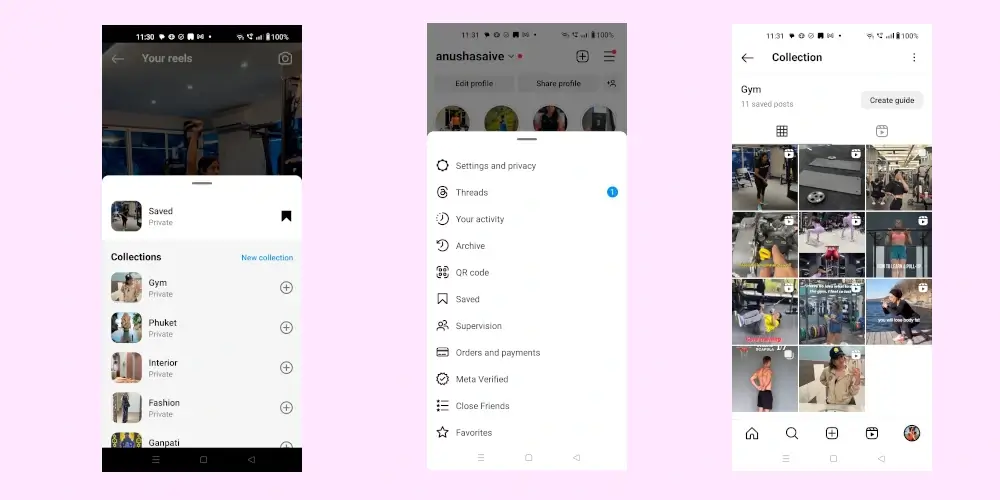
- To access your saved Reels, go to your profile, tap the three lines icon, and hit “Saved.” Here you can view all your saved content organized into relevant categories, including Reels.
How to Download Instagram Reels on iPhone
1. Download Reels Using the App
Instagram allows users to download Reels shared from public accounts effortlessly:
1- Tap the Paper Plane icon to share the Reel and choose “Add to Story.”

2- On your story, tap the three horizontal dots in the top-right corner and select “Save.”

3- The Reel will now be downloaded to your device, although keep in mind this method saves the story containing the Reel.
2. Download Reels via Screen Recording
Screen recording is an efficient way to capture Reels with their original sound:
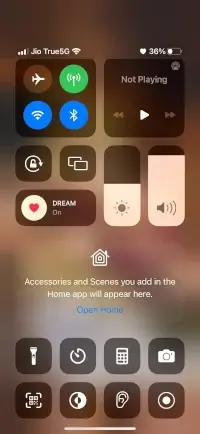
- Open your iPhone settings and navigate to Control Center.
- Add the Screen Recording option to included controls.
- Open the Instagram app, play the Reel, and swipe down to access the Control Center.
- Tap the Screen Recording button, then let the Reel play—this will also capture the audio, ensuring high-quality video and sound.
3. Download Reels Using Third-Party Apps
To download Reels directly with sound and video quality intact, consider using reliable third-party applications like InstDown or InSaver. These apps streamline the downloading process and enhance convenience.
How to Download Instagram Reels on Android
Downloading Reels on Android is also simple, with several methods available:
1. Download Reels Using the App
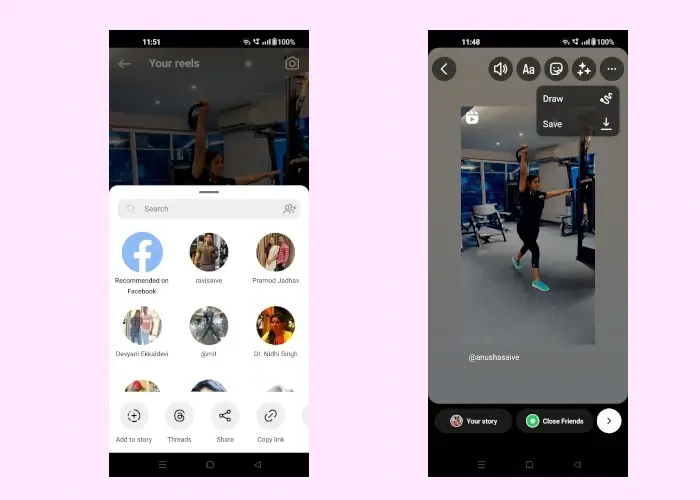
- Find the Reel you wish to download, tap on the Paper Plane icon, and select “Add to Story.”
- Tap the three dots in the top-right corner, then select “Save” to download the Reel.
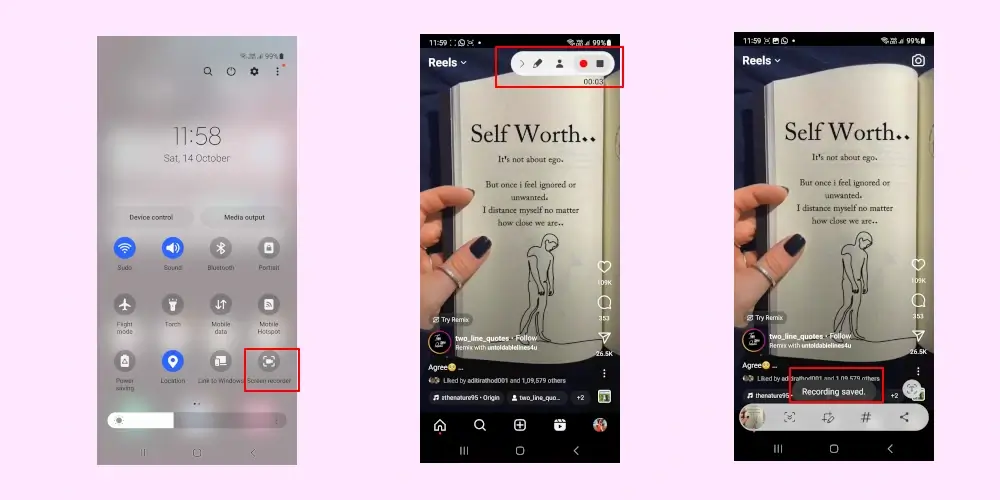
2. Download Reels via Screen Recording
Similar to iOS, Android offers a screen recording feature:
- Swipe down to reveal the notification bar and look for the Screen Recorder option.
- Open the desired Reel and begin recording—the Reel will be saved for future viewing.
3. Download Reels Using Third-Party Apps
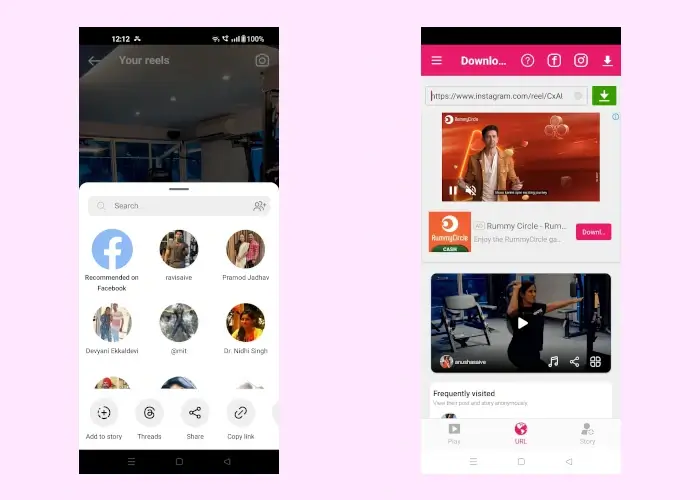
Numerous Android applications can expedite the download of Instagram Reels. To do this:
- Open the app, find the Reel, and copy the link.
- Paste the link into the downloader app.
- Hit Download, and the Reel will be saved to your device’s gallery.
Best Online Instagram Reel Downloaders
For users who prefer not to use apps, online downloaders offer an alternative solution:
These platforms allow you to copy the URL of the desired Reel, paste it into their input field, and download the content directly to your device.
Frequently Asked Questions (FAQs)
Q: When were Reels introduced?
A: Instagram launched Reels on August 5, 2020, designed to share short-form video content.
Q: Why did Instagram create Reels?
A: Reels were introduced to compete with platforms like TikTok, giving users a space to create and share enjoyable short videos.
Q: How long can a Reel be?
A: Instagram Reels can be up to 60 seconds long.
Q: Can I see who views my Reels?
A: No, unlike Instagram Stories, you cannot see who has viewed your Reels.
Conclusion
Instagram Reels serve as a powerful tool for content creators and everyday users to share and engage with captivating video content. Whether for inspiration, content curation, or entertainment, knowing how to download Instagram Reels enhances your viewing experience and ensures you can revisit your favorite videos. By following the methods outlined above, you can easily save Reels on iPhone, Android, or Desktop. Enjoy having a library of engaging content at your fingertips!
And if you'd like to go a step further in supporting us, you can treat us to a virtual coffee ☕️. Thank you for your support ❤️!

We do not support or promote any form of piracy, copyright infringement, or illegal use of software, video content, or digital resources.
Any mention of third-party sites, tools, or platforms is purely for informational purposes. It is the responsibility of each reader to comply with the laws in their country, as well as the terms of use of the services mentioned.
We strongly encourage the use of legal, open-source, or official solutions in a responsible manner.
Comments