

Tired of watching your virtual machines (VMs) crawl at a snail’s pace when copying files or running demanding applications? Does the progress bar feel like a cruel joke, mocking your powerful SSD? Apple has heard your cries and answered with ASIF, a new disk image format arriving with macOS Tahoe that promises to revolutionize the VM experience.
For those who rely on virtual machines, slow disk performance has always been a significant pain point. Even with a top-of-the-line Mac Studio M2 Ultra and a blistering-fast SSD, the performance of Linux or Windows VMs has often been disappointing. Existing UDSP (Sparse Image) formats have often been a bottleneck, with speeds often capped at a mere 100 MB/s, or even slower when encrypted. This effectively turns your cutting-edge NVMe SSD into a relic of the 1990s.
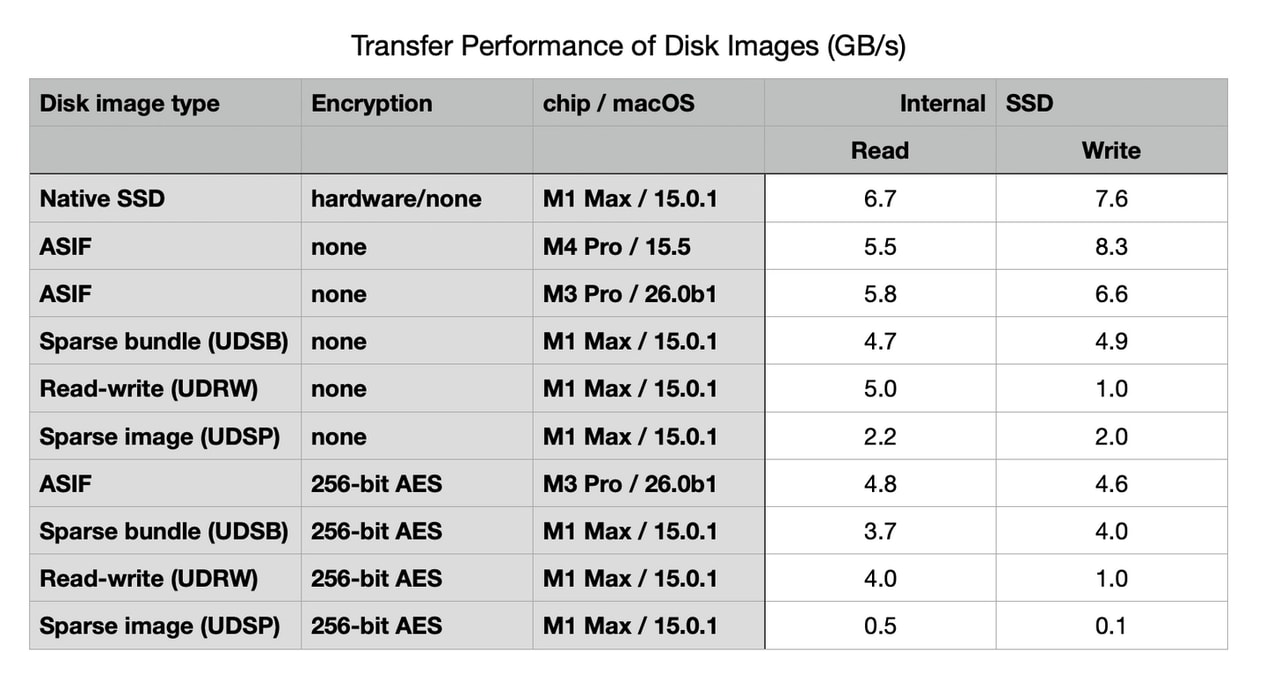
But now, Apple introduces ASIF (Apple Sparse Image Format), a game-changing technology designed to eliminate these performance limitations. Introduced in macOS Tahoe, ASIF promises speeds that rival your native SSD performance, reaching up to an astonishing 8.3 GB/s write speeds on an M4 Pro. That’s a staggering 83 times faster than encrypted UDSP!
The brilliance of ASIF lies in its architecture. According to Apple, its inherent structure is not constrained by the limitations of the host file system. This means an end to the bottlenecks that have plagued VM performance. The size of the ASIF file on your disk dynamically adjusts based on the data stored within the virtual disk image, similar to a sparse bundle, but with a massive speed boost.
How Does ASIF Work in Practice?
Currently, there are only two ways to create these high-performance disk images: through Disk Utility in Tahoe or via the command line using diskutil. Here’s the magic command:
diskutil image create blank --format ASIF --size 100G --volumeName myVolume imagePathThis command generates an ASIF image with a maximum size of 100 GB, formatted with APFS and named “myVolume”. You can also convert older image formats using the --from option, making migration of existing VMs a breeze.
The only drawback is that, for now, only macOS Tahoe can create ASIF images. While Sequoia 15.5 can mount and use them, it cannot create them. It’s like owning a Formula 1 car you can drive, but not build.
Performance Benchmarks: Speed Unleashed
The performance data is simply breathtaking. Benchmarks demonstrate that, on a MacBook Pro M3 Pro running Tahoe, you can achieve 5.8 GB/s read and 6.6 GB/s write speeds with a non-encrypted ASIF image. Even with AES 256-bit encryption enabled, read and write speeds remain impressive at 4.8 GB/s and 4.6 GB/s, respectively. On an M4 Pro, write speeds can soar to 8.3 GB/s!
Disk Image Format Performance Comparison
Here’s a quick comparison to highlight the performance differences. (You can create a table here, using data from the original article to enhance this section.)
The data speaks for itself. Encrypted UDSP sparse images deliver a paltry 0.5 GB/s read and 0.1 GB/s write speeds. ASIF, even with encryption, blows these numbers away, delivering speeds up to 4.8 GB/s read and 4.6 GB/s write. This is a paradigm shift in VM performance.
The Future of Virtualization on macOS
ASIF has been specifically engineered for efficient virtualization on Apple Silicon Macs. Apple officially recommends migrating from older RAW (UDIF read-write) images to ASIF to maximize performance.
From a technical perspective, ASIF images have a UTI type of com.apple.disk-image-sparse, allowing for easy identification. A 100 GB ASIF image initially consumes less than 1 GB of disk space, expanding to 2-3 GB after intensive use – a reasonable footprint.
One potential challenge is the absence of a dedicated API for creating ASIF images. Developers must currently rely on the diskutil command-line tool. This approach could be less seamless for third-party virtualization software like Parallels, VMware, and UTM. However, industry sources suggest that these developers are prepared to adapt quickly.
For developers, ASIF integrates with VZDiskImageStorageDeviceAttachment of the Virtualization framework. This is where the real magic happens, allowing VMs to tap into the full potential of your SSD. Say goodbye to two-hour Windows installations slowed by disk I/O limitations.
Limitations and Future Outlook
There are a few current limitations to consider. The backward compatibility of ASIF, regarding which macOS versions can mount and use the format, is still unknown, and Apple has yet to provide complete details. Also, creating ASIF images requires macOS Tahoe. Furthermore, documented support for compacting ASIF images using hdiutil is currently unavailable. However, these are minor considerations compared to the substantial performance gains. Your VMs will finally operate at lightning speed, eliminating the need for extended coffee breaks during installations and updates. ASIF is poised to transform the way you experience virtual machines.
And if you'd like to go a step further in supporting us, you can treat us to a virtual coffee ☕️. Thank you for your support ❤️!

We do not support or promote any form of piracy, copyright infringement, or illegal use of software, video content, or digital resources.
Any mention of third-party sites, tools, or platforms is purely for informational purposes. It is the responsibility of each reader to comply with the laws in their country, as well as the terms of use of the services mentioned.
We strongly encourage the use of legal, open-source, or official solutions in a responsible manner.
Comments