

Mousai is a free, open-source app designed to identify songs. If you’ve used Shazam or a similar service before, you’ll find Mousai just as straightforward. Even if you haven’t, it couldn’t be simpler.
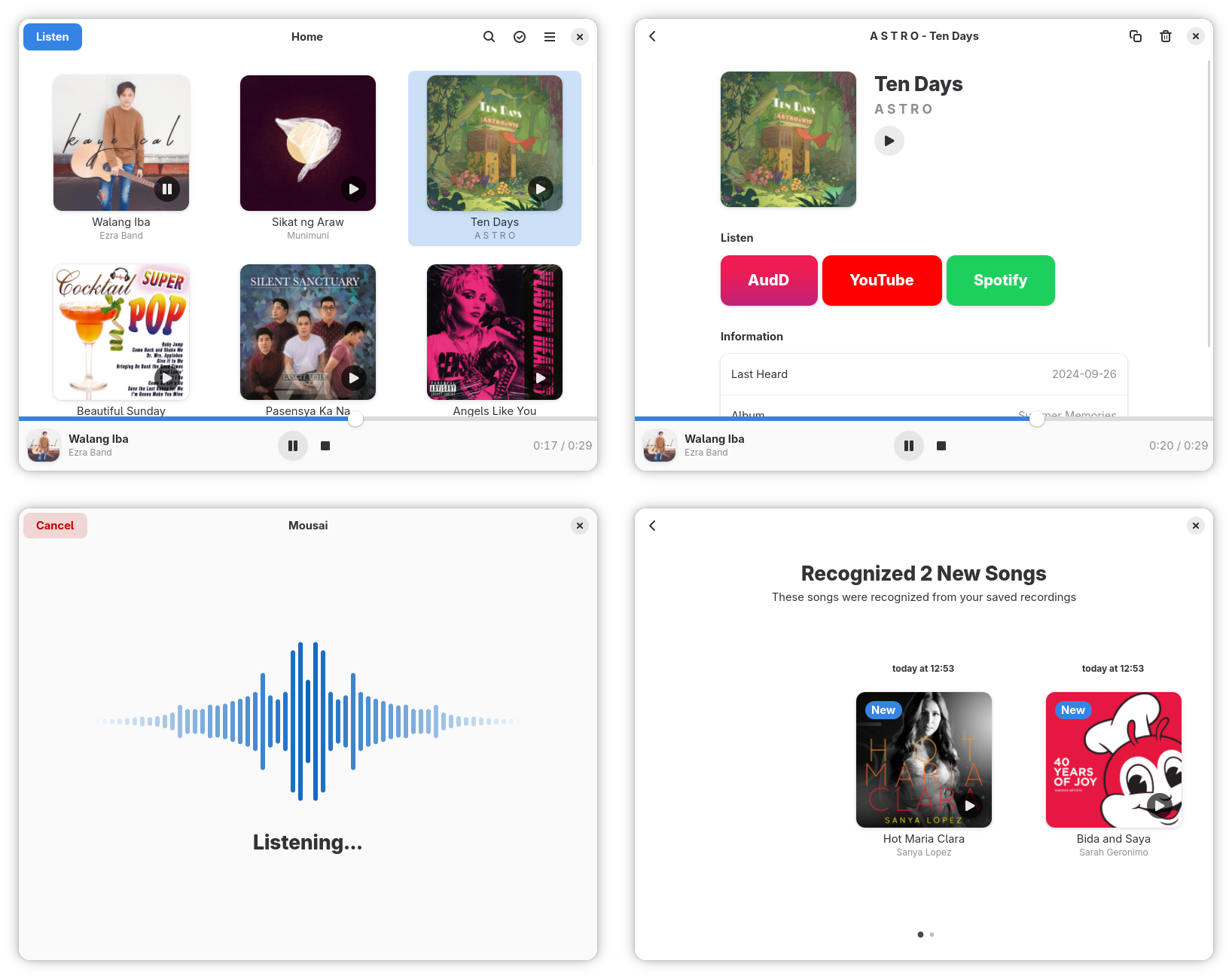
Just play the song you want to recognize in the background, open the app, and tap the Listen button. Within a few seconds, Mousai will display the title and artist of the track. It’s almost like magic!
Mousai is powered by AudD, a music recognition API capable of identifying around 60 million tracks from microphone recordings, user-generated content, and audio files—even radio broadcasts. Since it relies on the audd.io API, Mousai requires a token obtained by logging into the AudD website. If you leave this field blank, you’ll still receive a limited number of free trial tokens each day.
What I like most about Mousai is its simplicity and clean interface. It also includes a handy history feature, allowing you to revisit and review all the tracks you’ve identified
Features in Mousai
- Free and open-source — with source code available on GitHub.
- Clean, minimalist interface for effortless use.
- Works on GNU/Linux operating systems.
- Song recognition — instantly identify the title and artist.
- Flexible input — capture audio via microphone or directly from the desktop.
- Keyboard shortcut support for faster access.
- Quick access links — browse identified songs online.
- Seamless playback — preview tracks in your default audio player.
- Multilingual support, including Polish, Turkish, and Simplified Chinese.
- Built-in history — save recognized songs with album art for easy reference.
How to Install Mousai in Ubuntu Linux
The most convenient way to install Mousai is via Flatpak. If you’re running Ubuntu 18.10 or later but don’t have Flatpak installed, here is the command to run:
$ sudo apt install flatpak
On older Ubuntu versions, you need to add the PPA before running the install command:
$ sudo add-apt-repository ppa:alexlarsson/flatpak
$ sudo apt update
$ sudo apt install flatpak
Next, install the software Flatpak plugin with the command:
$ sudo apt install gnome-software-plugin-flatpak
Note: the Software app does not support the graphical installation of Flatpak apps even though it has been distributed as a Snap since Ubuntu 20.04. A deb version will be installed alongside the normal app if you install the Flatpak plugin.
Add the Flathub repository with this command and when the installation is complete, restart your system:
$ flatpak remote-add --if-not-exists flathub https://flathub.org/repo/flathub.flatpakrepo
Now that you’ve got Flatpak installed on your Laptop, simply run the following commands to install Mousai:
$ flatpak install flathub io.github.seadve.Mousai
$ flatpak run io.github.seadve.Mousai
END.
And if you'd like to go a step further in supporting us, you can treat us to a virtual coffee ☕️. Thank you for your support ❤️!

We do not support or promote any form of piracy, copyright infringement, or illegal use of software, video content, or digital resources.
Any mention of third-party sites, tools, or platforms is purely for informational purposes. It is the responsibility of each reader to comply with the laws in their country, as well as the terms of use of the services mentioned.
We strongly encourage the use of legal, open-source, or official solutions in a responsible manner.
Comments