


Are you a Rust developer looking to optimize your workflow? Bacon can help!
This fantastic utility takes care of checking your code in the background while you work, allowing you to focus on what really matters. It runs discreetly alongside your code editor and will alert you of any errors, warnings, or test failures in your Rust code. And all this without you having to lift a finger!
One of Bacon’s major advantages is that it highlights what really matters. Errors are displayed before warnings, and the most recent ones appear last, so there’s no need to scroll for hours to find an important message buried in the console!
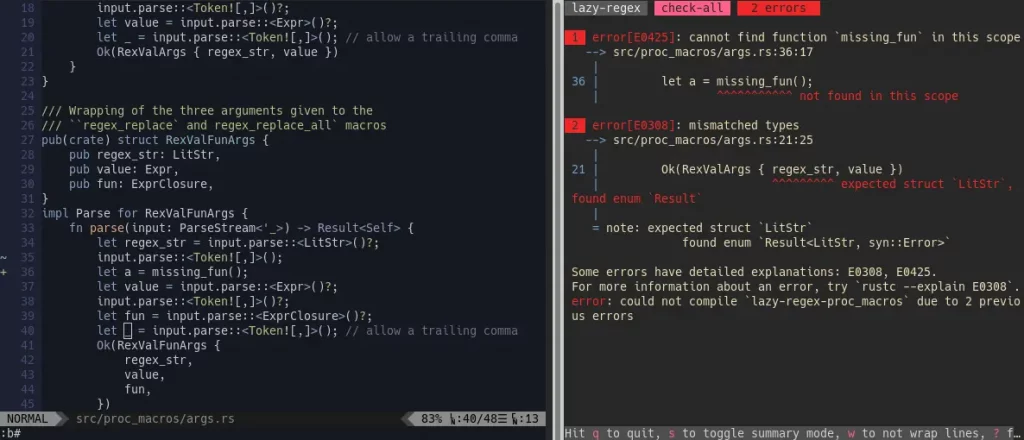
You also don’t need to remember 150 different commands, as the most essential ones are listed at the bottom of the screen.
To install Bacon, it’s straightforward:
cargo install --locked baconAnd to run it, just type:
baconBacon will then execute the default command, usually cargo check, and monitor your code. If you want to run tests instead, use:
bacon testWhile Bacon is running, you can display Clippy warnings with “c”, return to the previous task with “Esc”, or open the documentation (cargo doc) in your browser with “d”. And that’s just a glimpse of the possibilities!
Bacon also handles configuration very well through two files: prefs.toml for your global preferences (keyboard shortcuts, summary mode, etc.) and bacon.toml for project-specific settings (custom tasks, examples, Clippy settings…).
In short, it’s practical and customizable, whether you’re working on a small personal project or a large professional application.
And if you'd like to go a step further in supporting us, you can treat us to a virtual coffee ☕️. Thank you for your support ❤️!

We do not support or promote any form of piracy, copyright infringement, or illegal use of software, video content, or digital resources.
Any mention of third-party sites, tools, or platforms is purely for informational purposes. It is the responsibility of each reader to comply with the laws in their country, as well as the terms of use of the services mentioned.
We strongly encourage the use of legal, open-source, or official solutions in a responsible manner.
Comments