

What if you could turn an idea, a memory, or even a photograph into an original song? With Google Gemini, you can do exactly that. You don’t need a recording studio, musical instruments, or any experience with audio production. Just describe the music you want, and Gemini can turn your idea into a soundtrack.
The feature is powered by Lyria 3.5, Google DeepMind’s music-generation model. It can create songs with vocals, lyrics, and instrumental arrangements from text prompts and visual inspiration. You can also choose between shorter clips and longer compositions, making it useful for everything from quick social media soundtracks to personalized songs.
In this guide, you’ll learn how Gemini’s AI music generator works, what you need to use it, how to create your first track for free, and how to write better prompts for more interesting results.
What Is AI Music Generation in Google Gemini?
Google Gemini includes an AI music-generation feature powered by Lyria, a family of generative music models developed by Google DeepMind. Its newer Lyria 3.5 model improves musical arrangements, lyrics, and vocal quality, helping produce more expressive and coherent tracks.
Instead of composing music manually, you describe what you want to hear. Gemini uses your prompt to generate a track that can include:
- Vocals and lyrics: Create songs with original lyrics and different vocal characteristics.
- Instrumental music: Generate background tracks without singing.
- Different genres: Explore styles such as pop, rock, hip-hop, R&B, jazz, electronic music, and more.
- Custom arrangements: Describe instruments, tempo, mood, and the overall structure of the song.
- Visual inspiration: Upload an image or video to help guide the music’s atmosphere and theme.
Gemini can also generate custom cover artwork for your track, giving the result a more complete, shareable presentation.
The feature is available directly in the Gemini app and on the web, so you don’t need to install a separate music-generation application.
Why Would You Want to Generate Music with AI?
AI-generated music isn’t just a novelty. It can be useful in several everyday situations.
Create Background Music for Work
If you prefer listening to music while working, you can generate a custom instrumental track designed around your preferences. Ask Gemini for a relaxing lo-fi beat, a soft piano composition, or an atmospheric electronic soundtrack for a focused work session.
You can describe the mood and instruments instead of spending time searching through music libraries.
Make Soundtracks for Videos and Social Media
Content creators can use Gemini to experiment with original background music for videos, short-form content, presentations, and personal projects. You can even upload a photo or video to give Gemini additional creative context.
However, don’t assume that an AI-generated track is automatically cleared for every commercial use. If you’re using music in monetized content, advertising, or client projects, check Google’s applicable terms and the rules of the platform where you plan to publish it.
Create Personalized Songs for Friends and Family
This is where AI music generation gets particularly entertaining. You can create a song about an inside joke, a family memory, a birthday, or an unforgettable holiday.
For example, you could ask Gemini to generate a nostalgic Afrobeat song about your hometown or a dramatic R&B ballad about a friend’s questionable cooking skills.
The more personal and specific your description, the more closely the result can reflect your idea.
How Gemini’s AI Music Generator Works
Gemini turns your instructions into music using Google’s Lyria model. You can start with a written description or provide an image or video as inspiration.
Your prompt can include details such as:
- Genre: Pop, jazz, Afrobeat, R&B, rock, electronic, or classical.
- Mood: Happy, nostalgic, romantic, dramatic, relaxing, or energetic.
- Tempo: Slow, moderate, or fast.
- Instruments: Piano, acoustic guitar, synthesizers, drums, strings, or bass.
- Vocals: Male or female vocals, harmonies, or an instrumental-only arrangement.
- Song structure: An intro, verses, chorus, bridge, and outro.
- Story: The subject or message you want the lyrics to communicate.
You don’t need to understand music theory. Natural-language descriptions are enough to get started, and you can experiment with different instructions until you find a result you like.
Lyria 3.5: Better Vocals and Longer Songs
Google’s original Lyria 3 model generated short, 30-second tracks. Since then, Google has introduced longer-generation options and upgraded its music-generation technology.
Lyria 3.5 brings improvements to musicality, vocal expression, lyrics, and arrangements. It can produce more developed compositions, with clearer song structures and more expressive performances.
Gemini also lets you choose between shorter and full-length tracks. Depending on the selected option, a full song can run for approximately two to three minutes.
This makes the feature more practical than the original short-clip experience. You can generate a quick musical idea or experiment with a longer composition containing verses and choruses.
SynthID: Identifying AI-Generated Music
Google embeds SynthID into music generated with its AI tools. This technology adds an imperceptible watermark designed to help identify content created by Google’s generative AI systems.
The watermark doesn’t change how the track sounds. It provides a way to identify AI-generated audio and supports greater transparency around synthetic content.
Who Can Use Gemini’s Music Generator?
Getting started is relatively straightforward. You need:
- A Google Account.
- Access to the Gemini app or the Gemini website.
- To be at least 18 years old.
- Keep Activity enabled in your Gemini settings.
Music generation is available through Gemini on the web and mobile devices. Google provides the feature globally in supported regions, although availability can depend on your account type, location, and applicable service restrictions.
The basic music-generation feature is available without a paid subscription. Some options and usage limits can vary depending on your account and the Gemini plan you’re using.
You can check Google’s official Gemini music-generation instructions for the latest eligibility requirements and availability details.
How to Generate AI Music for Free with Google Gemini
You can create your first AI-generated song in just a few steps. The following instructions apply to the Gemini web app and mobile app.
Step 1: Open Google Gemini
Visit gemini.google.com or launch the Gemini app on your smartphone.
Sign in using your Google Account. Make sure you’re using an eligible account and that Keep Activity is enabled.
Step 2: Open the Music Generation Tool
At the bottom of the prompt box, click or tap Upload & tools.
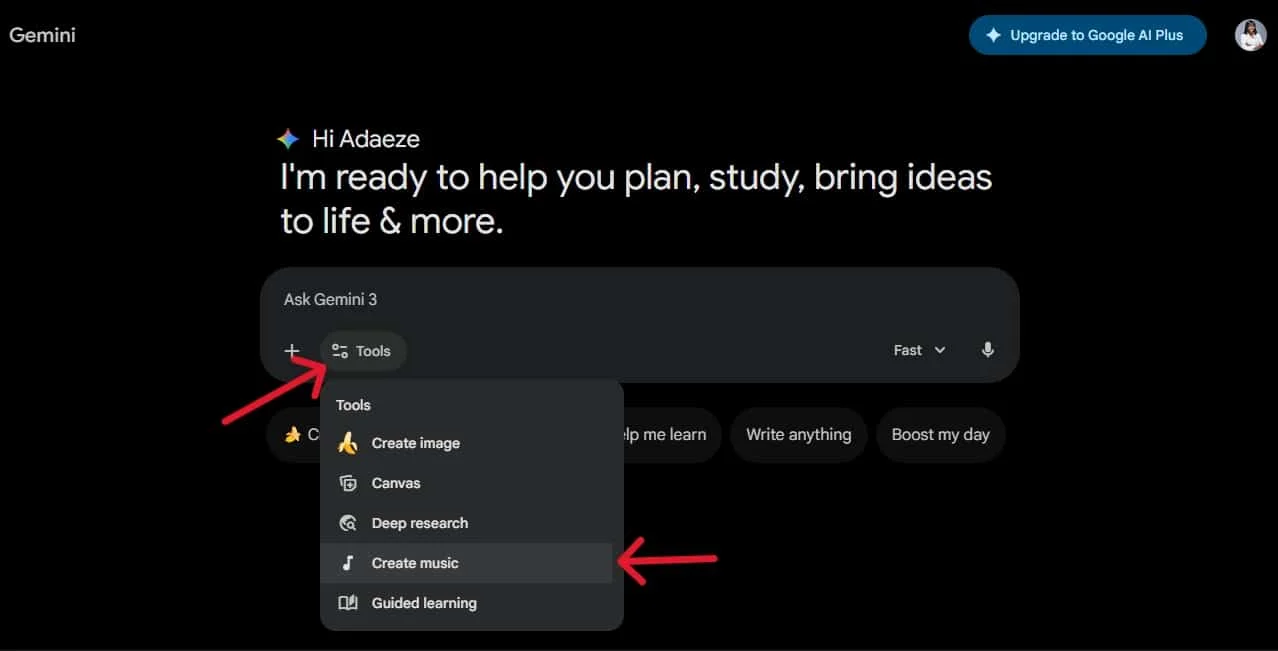
From the available tools, select Create music.
Step 3: Describe the Music You Want
Gemini will open its music-generation interface. Enter a prompt describing the track you want to create.
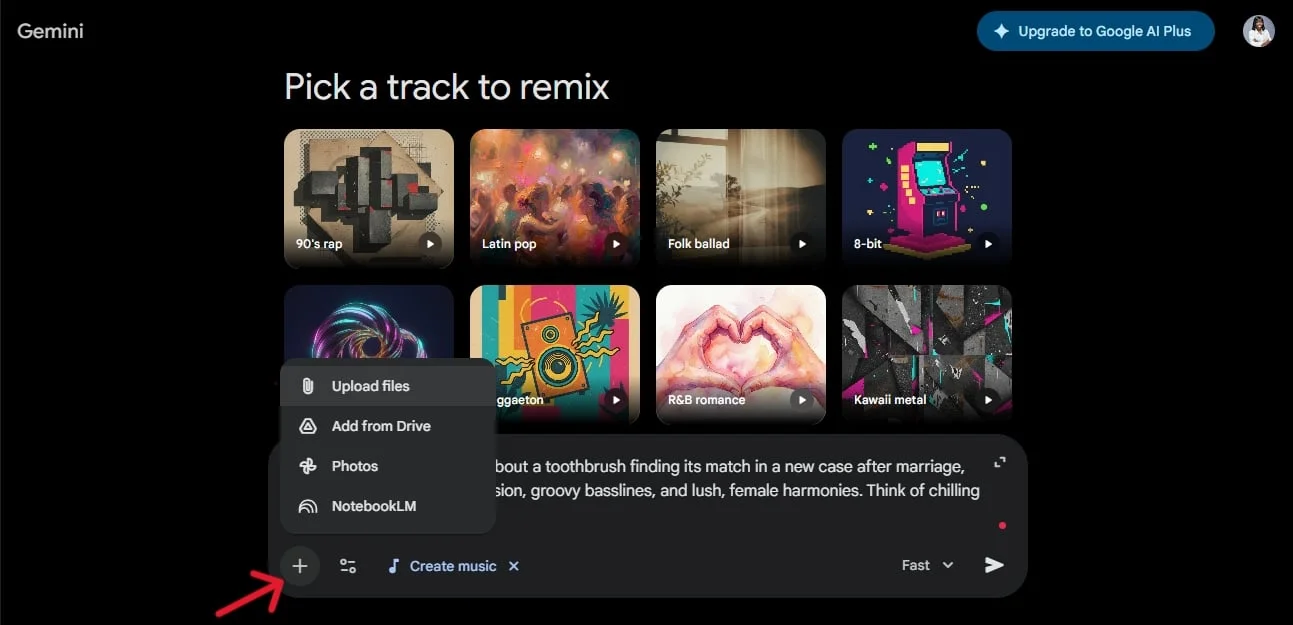
For the best results, include details about the genre, mood, tempo, instruments, vocals, and subject of the song.
You can also upload an image or video to provide visual inspiration.
Step 4: Customize Your Track
Depending on the options available in your Gemini interface, you can adjust elements such as:
- Track length: Choose a shorter clip or a full-length composition.
- Vocals: Decide whether you want a song with vocals or instrumental music.
- Genre: Select a musical direction for your track.
You can also start from one of the available templates and customize it with your own instructions.
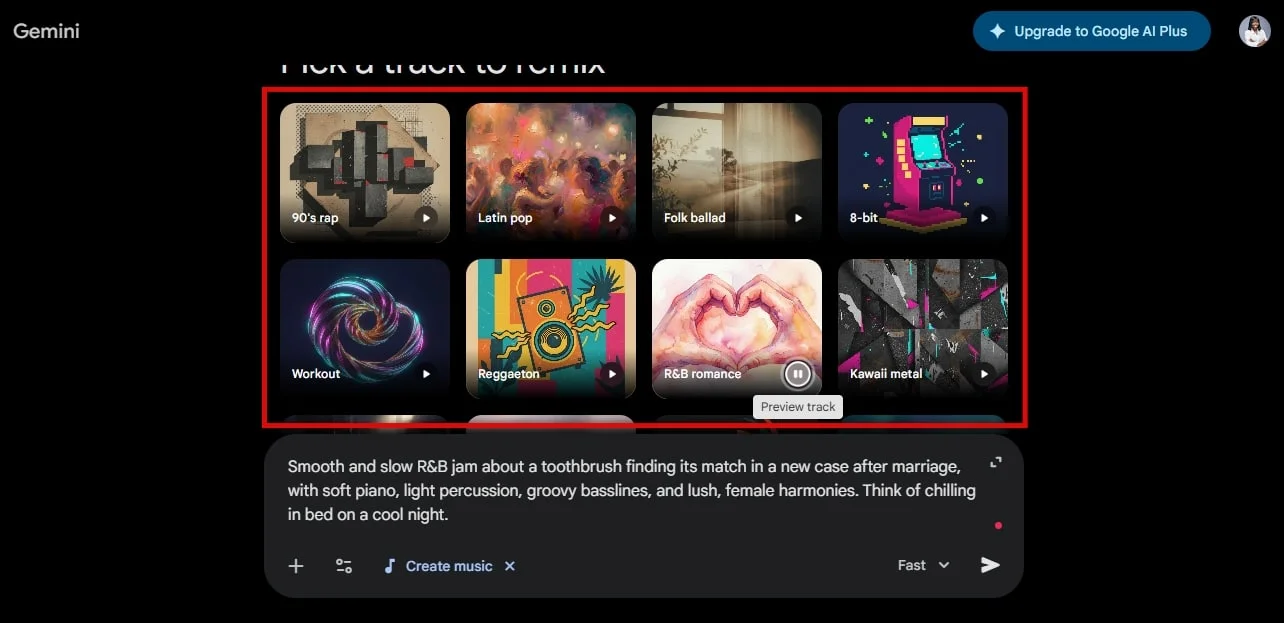
Step 5: Generate Your Music
Once you’re happy with your prompt and settings, click the send button.

Gemini will process your request and generate the music. The time required can vary depending on the track and the service’s current workload.
Step 6: Listen, Download, or Share Your Track
When the generation is complete, you can listen to the result directly in Gemini.
You can download the finished track, share it with friends, or post it on supported social platforms. Depending on the interface, you may also have options to display or hide the lyrics or subtitles.
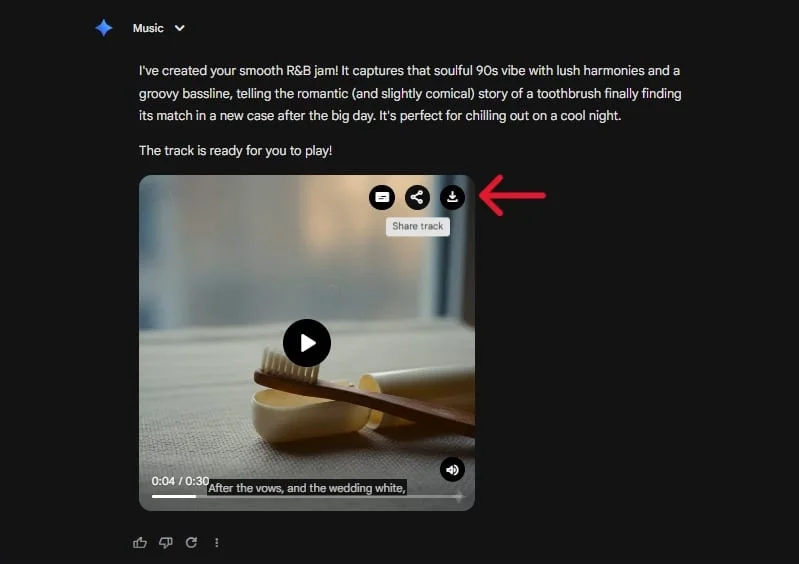
That’s it! You’ve just created an original AI-generated track without using a traditional music-production application.
Sample Prompts for Generating AI Music in Gemini
The quality of your generated music depends heavily on the instructions you provide. A vague prompt might produce something generic, while a detailed description gives Gemini a clearer creative direction.
Here are a few prompts you can experiment with.
1. A Relaxing R&B Song
Create a smooth, slow R&B song about a toothbrush finding its perfect match in a new case after marriage. Use soft piano, light percussion, groovy basslines, and warm female harmonies. Make it playful, romantic, and slightly humorous, like a late-night conversation on a cool evening.2. An Energetic Afrobeat Track
Create an upbeat Afrobeat song celebrating friendship and unforgettable summer nights. Use lively percussion, rhythmic guitar, deep bass, and catchy melodic vocals. Give it a joyful, danceable atmosphere with a memorable chorus.3. A Cinematic Instrumental
Generate a cinematic instrumental soundtrack for an emotional movie scene. Start with gentle piano and atmospheric strings, gradually introduce deep percussion, and build toward a powerful orchestral climax. Make it dramatic, nostalgic, and inspiring. No vocals.4. A Lo-Fi Track for Concentration
Create a mellow lo-fi hip-hop instrumental for studying and deep work. Use warm vinyl textures, soft piano chords, gentle drums, and a relaxed bassline. Keep the rhythm steady and the atmosphere peaceful, without vocals or sudden changes.5. A Funny Birthday Song
Create a funny, energetic pop song for a friend's birthday. The lyrics should celebrate their personality, their terrible sense of direction, and their legendary ability to arrive late to everything. Use catchy vocals, playful synths, upbeat drums, and a memorable chorus.Tips for Getting Better Results from Gemini’s AI Music Generator
A good prompt is more than a genre name. If you want more control over the final track, try these techniques.
Be specific about the sound. Instead of asking for a relaxing song, describe the instruments, rhythm, and atmosphere. For example, request soft piano, gentle acoustic guitar, and slow percussion.
Describe the vocals. If you want a song with a particular vocal character, describe the voice in general terms. You can ask for warm female harmonies, a deep male voice, or an expressive vocal performance.
Explain the story. If the song should be about a person, place, or memory, include the important details. This gives Gemini more context for generating lyrics that match your idea.
Mention the song structure. For longer compositions, ask for an instrumental introduction, two verses, a catchy chorus, a bridge, and a final outro.
Experiment with variations. Your first result might not be exactly what you imagined. Try changing the tempo, mood, instruments, or vocal direction rather than rewriting the entire prompt.
Final Thoughts
Google Gemini has made AI music generation much easier to explore. With Lyria 3.5, you can turn a written idea, a personal memory, or a visual reference into an original musical composition without learning music-production software.
The ability to create longer tracks makes the feature more useful than the original 30-second experience. Whether you want background music for a video, a personalized birthday song, or simply something entertaining to share with friends, Gemini gives you an accessible way to experiment.
You don’t need to be a musician to get started. Describe what you want to hear, try a few variations, and see what Gemini creates.
Add Tech2Geek as a preferred source on Google to see more of our latest tech articles.
Support Tech2Geek ❤️
Did this guide help you? If Tech2Geek saves you time or helps you solve a problem,
consider buying me a coffee. ☕
Your support helps keep Tech2Geek independent and free.
Comments