
Meta has introduced Muse Image, its newest AI image generation model, and while it offers powerful creative features, it has also sparked widespread privacy concerns.
One feature in particular has drawn criticism from privacy advocates, creators, and performers: if your Instagram account is public, other people can use your public photos as visual references to generate entirely new AI-created images—without asking for your permission or notifying you.
Fortunately, Meta allows you to disable this feature. Here’s everything you need to know about Muse Image, why it’s controversial, and how to opt out in just a few taps.
What Is Meta Muse Image?

Launched on July 7, 2026, Muse Image is Meta’s newest AI image generation model developed by Meta Superintelligence Labs.
Unlike previous Meta AI image tools, Muse Image is designed to:
- Generate high-quality images from detailed text prompts
- Edit existing images with greater precision
- Combine multiple photos into one composition
- Iteratively improve generated artwork
The model is currently available through:
- Meta AI app
- Meta AI website
- Instagram AI effects
- WhatsApp (limited regions)
Support for Facebook and Messenger is expected to arrive later.
Why Is Muse Image Controversial?
The controversy isn’t the AI model itself.
It’s how it interacts with public Instagram accounts.
Anyone can simply mention a public Instagram username inside Muse Image, allowing the AI to reference that person’s public posts when generating new images.
Meta promotes this feature for harmless uses like:
- Birthday invitations
- Greeting cards
- Group event artwork
However, critics argue that it also makes it easier to generate AI images of people who never explicitly agreed to participate.
Even more concerning:
- Public accounts are enrolled automatically.
- Users receive no notification if someone references their photos.
- There is no activity history showing who used your images.
Private accounts and users under 18 are excluded automatically.
Why Privacy Experts Are Concerned
Several organizations have criticized Meta’s approach.
Among them:
- SAG-AFTRA
- Creative Artists Agency (CAA)
- Privacy International
Their primary concern is that participation is opt-out instead of opt-in.
Instead of asking users for permission, Meta enables the feature by default for eligible public accounts.
Critics argue this lowers the barrier for misuse, including:
- Deepfake creation
- Identity impersonation
- Romance scams
- Online harassment
- Fake social media content
Although Meta says the system includes safety protections, many privacy advocates believe users should have been asked before their public images became available to AI generation tools.
How to Opt Out of Muse Image
You don’t need to make your Instagram account private.
Meta includes a dedicated setting that disables AI reuse of your public content.
Step 1
Open Instagram.
Go to your profile.
Step 2
Tap the ☰ menu in the upper-right corner.
Step 3
Select:
Settings and activity
Step 4
Scroll down to:
Sharing and reuse
Depending on your version of Instagram, this option may appear under:
How others can interact with you
Step 5
Locate the setting similar to:
Allow people to use your content on Instagram and with AI features on Meta
The wording may vary slightly between app versions.
Step 6
Turn OFF:
- Posts
- Reels
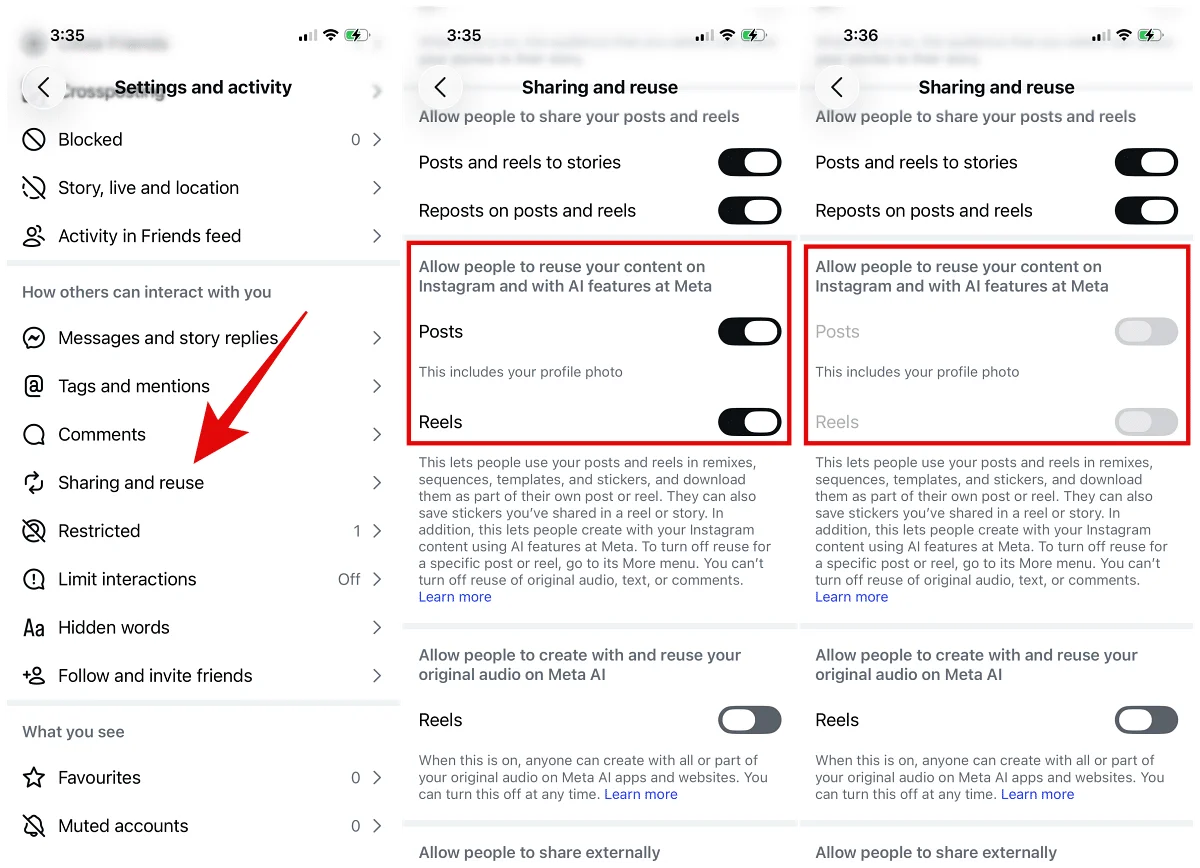
If available, disable:
- Original audio
Once disabled, other users can no longer use your public posts and reels as references inside Muse Image.
What If You Can’t Find the Setting?
Meta is rolling the feature out gradually.
If you don’t see the option:
- Update Instagram from the App Store or Google Play.
- Restart the app.
- Check again over the next few days.
Meta occasionally changes the wording, so look for any option mentioning AI features, reuse, or content on Meta.
Additional Ways to Protect Your Photos
Disabling Muse Image is only one part of protecting your content.
Here are several additional privacy measures.
Make Your Account Private
This is the strongest protection currently available.
Private Instagram accounts are automatically excluded from Muse Image.
To enable it:
Settings → Privacy → Private Account
Only approved followers will be able to see your posts.
Restrict Individual Posts
Instagram also lets you manage reuse settings on specific posts.
This can be useful if you only want to protect certain images while keeping the rest of your profile public.
Object to Meta AI Training
Turning off Muse Image does not necessarily stop Meta from using your data to improve its own AI models.
That requires a separate request.
Navigate to:
Settings and activity → Privacy Center
Look for:
AI at Meta
or
Right to Object
Depending on your country, you may be able to submit a request asking Meta not to use your information for AI training.
Availability varies by region.
What the Opt-Out Doesn’t Do
The setting has several important limitations.
It Doesn’t Remove Existing AI Images
If someone already generated AI images using your public content before you disabled the feature, those creations remain unaffected.
The setting only blocks future use.
You Won’t Know If Someone Already Used Your Photos
Meta currently provides:
- No notifications
- No history
- No activity log
There’s no way to determine whether someone previously referenced your Instagram profile.
It Doesn’t Stop Third-Party AI Tools
The setting only affects Meta’s own AI features.
Other AI services may still scrape publicly available Instagram images if your account remains public.
What About Meta’s AI Watermark?
Muse Image also introduces Content Seal, an invisible digital watermark embedded into AI-generated images.
According to Meta, the watermark survives:
- Cropping
- Compression
- Resizing
- Screenshots
Meta is also developing a public detector that can verify whether an image contains this hidden watermark.
However, because the watermark isn’t visible to the human eye, it may not satisfy upcoming regulations in some regions.
EU AI Rules Could Affect Muse Image
Beginning August 2, 2026, the EU AI Act requires many AI-generated or AI-modified images shared within the European Union to include visible labeling.
Meta’s invisible Content Seal alone may not meet those requirements.
If Muse Image expands throughout Europe, Meta may need to introduce additional visible labels for AI-generated content.
Frequently Asked Questions
Does Muse Image use private Instagram photos?
No.
Only public Instagram posts and reels can be referenced.
Private accounts and users under 18 are excluded automatically.
Can someone generate AI images using my Instagram profile?
Yes, if:
- Your account is public.
- The AI reuse setting is enabled.
Disabling the feature prevents future AI image generation using your eligible content.
Does opting out affect my Instagram account?
No.
Your:
- Followers
- Posts
- Reels
- Stories
- Engagement
remain unchanged.
Only AI reuse by other users is disabled.
Do private accounts need to opt out?
No.
Private Instagram accounts are already excluded from Muse Image.
Will Meta notify me if someone uses my photos?
No.
Meta currently does not notify users when their public content is used to generate AI images.
Can I enable the feature again later?
Yes.
You can return to Settings and activity → Sharing and reuse and re-enable the option at any time.
Does opting out stop Meta from training its AI?
Not necessarily.
The Muse Image toggle only controls whether other users can use your content in Meta’s AI image generation tools.
If you also want to object to Meta using your data for AI training, you’ll need to submit a separate request through Meta’s Privacy Center, where available.
Conclusion
Muse Image showcases Meta’s latest advances in AI image generation, but it also raises significant questions about privacy, consent, and digital identity.
Because public Instagram accounts are included by default, many users may be unaware that their photos can serve as references for AI-generated images. Fortunately, Meta provides an opt-out option that takes less than a minute to enable.
If maintaining control over your online likeness is important, it’s worth reviewing your Instagram privacy settings today. Combining the Muse Image opt-out with a private account, stronger privacy controls, and two-factor authentication offers the best protection against unwanted AI use of your content.
Add Tech2Geek as a preferred source on Google to see more of our latest tech articles.
Support Tech2Geek ❤️
Did this guide help you? If Tech2Geek saves you time or helps you solve a problem,
consider buying me a coffee. ☕
Your support helps keep Tech2Geek independent and free.
Comments