

Let’s be honest—every team has that story.
The intern who stayed six months and somehow ended up with access to everything: production servers, AWS credentials, even the root password for a custom environment. Their contract ended last Friday… but did their access really disappear?
Or the senior developer who left abruptly after years—taking undocumented knowledge (and critical credentials) with them. Then comes the awkward moment:
“Does anyone know the production password?”
Silence. Slack freezes. Nobody answers.
This isn’t rare—it’s the norm. And it’s exactly the kind of chaos Passbolt was built to eliminate.
The Spreadsheet Problem No One Wants to Admit
It goes by many names:
passwords.xlsxcredentials_FINAL_v3.xlsx- Or the ultra-discreet
notes.txt
Hidden in a shared Google Drive folder, accessible to people who no longer even work at the company—it’s messy, insecure, and surprisingly common.
Worse still, leaked credentials often remain active for years. Many developers still retain access to systems from previous jobs. That “temporary” access? It may not be so temporary.
What Makes Passbolt Different?
Passbolt isn’t just another password manager with a “share” button slapped on top. It’s designed from the ground up for teams.
- Open source and transparent
- Built in Europe
- Trusted by 50,000+ organizations worldwide
But more importantly, it solves real-world problems in a way most tools don’t.

Instant Access Revocation (No More Guesswork)
When someone leaves your team, access should disappear instantly—not linger indefinitely.
With Passbolt:
- Each secret is encrypted per user and per version
- Removing a user deletes their encrypted access permanently
- All credentials they accessed are automatically flagged as expired
- Owners receive alerts to rotate sensitive data
This is known as forward secrecy—and it ensures former employees cannot reuse old credentials.
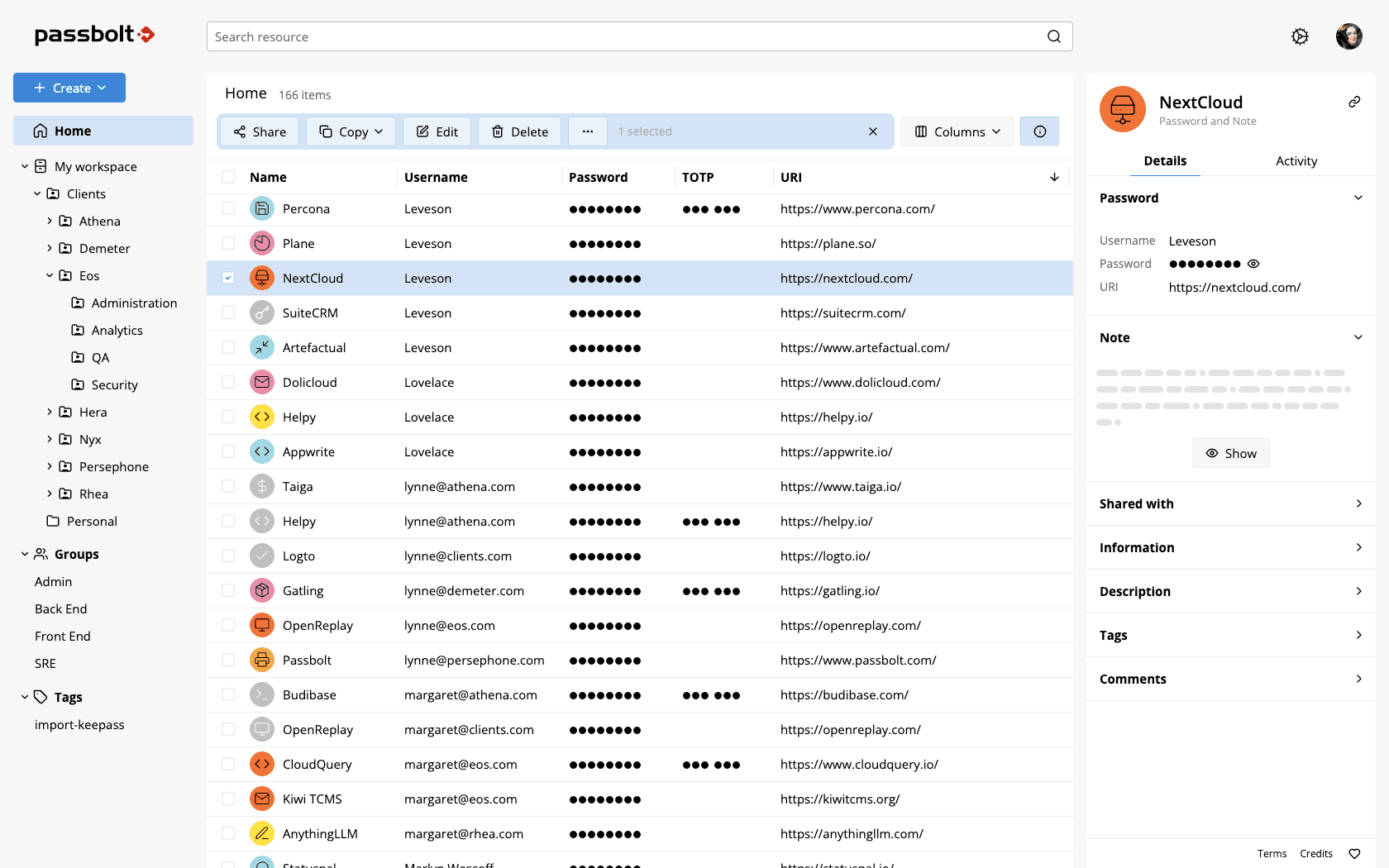
Granular Sharing Built for Real Teams
Not all access is equal—and Passbolt understands that.
You can:
- Share a single credential
- Assign precise permissions (read, edit, owner)
- Restrict access to specific users or groups
Every action is logged:
- Who accessed what
- Who modified or shared data
- When it happened
Sensitive operations are cryptographically signed, giving you a reliable audit trail for compliance and security reviews.
More Than Just Password Storage
Passbolt goes far beyond basic username/password storage.
You can securely manage:
- TOTP configurations for multi-factor authentication
- API tokens and SSH keys
- Encrypted notes
- Custom key-value fields for complex secrets
Perfect for handling everything typically scattered across .env files, Slack messages, or internal docs.
Easy Migration From Other Tools
Switching doesn’t have to be painful.
Passbolt supports native import from:
You can migrate your entire vault in just a few clicks.
Security That Actually Holds Up
Passbolt takes security seriously—no shortcuts.
To access your vault, you need:
- A master passphrase
- A private OpenPGP key generated on your device
Even if someone steals your password, they can’t access anything without the private key.
Key highlights:
- End-to-end encryption (client-side only)
- Zero-knowledge architecture (server can’t read your data)
- Even metadata (like credential names) is encrypted
There’s also a built-in anti-phishing visual token—a unique color and 3-letter code that helps you detect fake login pages instantly.
Built for Developers and DevOps Teams
Passbolt is API-first, making it ideal for modern workflows.
- Full REST API
- CLI tool written in Go
- CI/CD integration via
passbolt://references - Works with Kubernetes, Ansible, Terraform
Secrets can be injected dynamically into pipelines—without ever exposing them in plain text.
Browser extensions (Chrome, Firefox, Edge, Brave) and mobile apps (iOS, Android) ensure seamless daily use.
Truly Free (No Hidden Limits)
The Passbolt Community Edition is genuinely free.
No:
- User limits
- Trial periods
- Feature restrictions
You get:
- Unlimited users
- Full sharing capabilities
- MFA (including YubiKey support)
- API & CLI access
- Mobile apps and browser extensions
You can self-host it on:
- Docker
- Debian / Ubuntu
- Kubernetes
- Even a Raspberry Pi
Setup takes minutes, whether via guided installer or manual deployment.

Flexible Business & Cloud Options
For advanced needs, Passbolt offers paid plans starting at €4.50/user/month:
- Single Sign-On (SSO)
- LDAP integration
- Audit logs
- Account recovery
- Priority support
Prefer not to self-host? A fully managed cloud version is also available with quick setup and zero infrastructure overhead.
Open Source, Transparent, and Audited
Passbolt is 100% open source (AGPL v3)—including its paid versions.
Security transparency includes:
- Publicly available independent audit reports
- Multiple audits passed with zero critical vulnerabilities
- Ongoing certification with France’s ANSSI (CSPN)
No trackers. No analytics. Your data stays under your control.
Time to Ditch the Spreadsheet for Good
That shared Excel file? It’s a liability waiting to happen.
Passbolt offers a modern, secure, and team-focused alternative—built by developers who’ve faced the exact same challenges.
With fast deployment, a powerful free edition, and enterprise-grade security, it’s one of the smartest upgrades you can make to your workflow.
Your team deserves better than “passwords.xlsx.”
And if you'd like to go a step further in supporting us, you can treat us to a virtual coffee ☕️. Thank you for your support ❤️!

We do not support or promote any form of piracy, copyright infringement, or illegal use of software, video content, or digital resources.
Any mention of third-party sites, tools, or platforms is purely for informational purposes. It is the responsibility of each reader to comply with the laws in their country, as well as the terms of use of the services mentioned.
We strongly encourage the use of legal, open-source, or official solutions in a responsible manner.
Comments