
One of the most common criticisms directed at Windows 11 since its release has been the limited ability to customize its interface. Compared to earlier versions of Microsoft’s operating system, many UI elements in Windows 11 feel more rigid and less flexible.
Over time, users have repeatedly asked Microsoft to bring back features that allowed deeper personalization. In response, the company recently promised to listen more closely to user feedback and gradually improve the experience.
Recent leaks now suggest that some long-requested customization options could soon arrive—particularly for the Quick Settings panel in the taskbar.
Quick Settings in Windows 11 Could Become More Flexible
The new features were discovered by well-known Windows leak analyst Phantomofearth on the social platform X.
According to the leak, a recent preview build of Windows 11 contains several improvements aimed at making the Quick Settings panel more customizable.
Since these features were spotted in a development build, it is still unclear when—or if—they will roll out to all users.
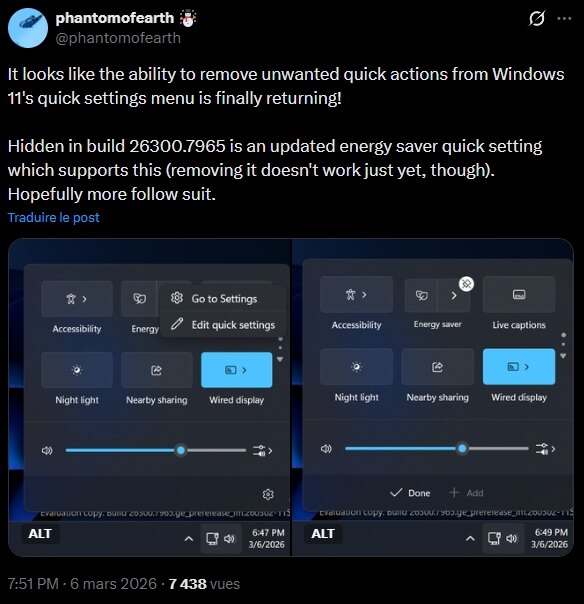
Users May Finally Be Able to Remove Quick Settings Tiles
Currently, the Quick Settings panel appears when users click the network, volume, or battery icon on the right side of the taskbar.
This panel contains quick toggles for features such as:
- Night Light
- Live Captions
- Battery Saver
- Wi-Fi and Bluetooth
Users can rearrange these tiles, but there is a major limitation: they cannot remove tiles they don’t use.
According to the leak, Microsoft may soon restore a feature that existed in earlier versions of Windows. Users would be able to right-click a Quick Settings tile and remove it directly from the panel.
This change would make the panel far more useful by allowing users to keep only the controls they actually need.
A New “Add” Button Could Expand Customization
Another small but important detail discovered in the preview build is a new “Add” button located at the bottom of the Quick Settings interface.
This suggests Microsoft may be preparing a more flexible system where users can:
- remove unwanted toggles
- add new quick actions
- reorganize the panel more freely
At the moment, these features are not fully functional in the test build, which indicates that Microsoft is still actively developing them.
Improved Battery Saver Controls
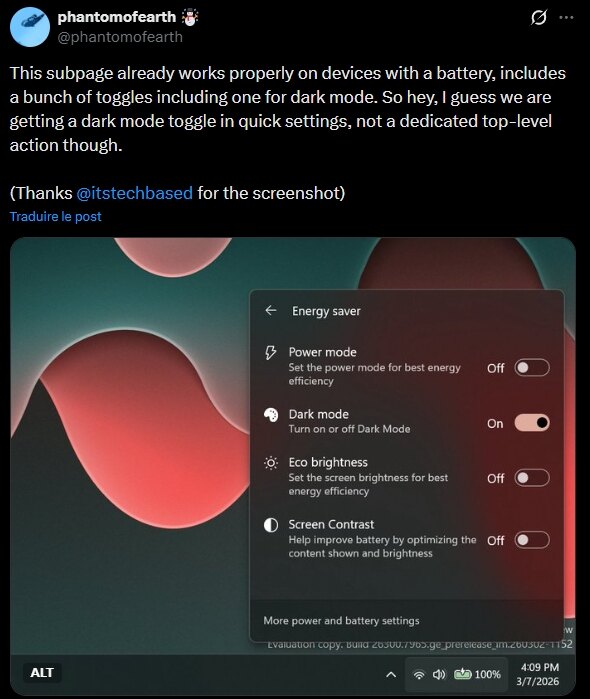
The leak also revealed a new sub-menu for Battery Saver.
In this version, the Battery Saver tile is divided into two sections, opening a menu with additional options aimed at extending battery life.
Users may soon be able to enable energy-saving settings directly from Quick Settings, including:
- activating dark mode
- reducing screen brightness
- limiting display contrast
These options could make it easier to manage battery consumption without opening the full Settings app.
Network Speed Test Shortcut Added
Microsoft has already started improving the Quick Settings area in recent updates.
One recent addition allows users to perform a network speed test directly from the taskbar.
By right-clicking the network icon, users can now quickly launch a speed test without opening a web browser or third-party tool.
While this feature may seem small, it highlights Microsoft’s ongoing effort to make the taskbar and Quick Settings panel more practical and efficient.
A Step Toward a More Customizable Windows 11
Customization has long been one of the strengths of Windows compared to other operating systems. However, the initial design of Windows 11 removed or simplified several features that users relied on in previous versions.
If these leaked improvements make their way into a future update, they could represent a significant step toward restoring flexibility in the Windows interface.
Combined with other upcoming changes—such as a resizable and movable taskbar—Windows 11 may finally start addressing one of the biggest complaints from its user community.
And if you'd like to go a step further in supporting us, you can treat us to a virtual coffee ☕️. Thank you for your support ❤️!

We do not support or promote any form of piracy, copyright infringement, or illegal use of software, video content, or digital resources.
Any mention of third-party sites, tools, or platforms is purely for informational purposes. It is the responsibility of each reader to comply with the laws in their country, as well as the terms of use of the services mentioned.
We strongly encourage the use of legal, open-source, or official solutions in a responsible manner.
Comments