


The Raspberry Pi has exploded in popularity across the United States and worldwide. From home servers and coding classrooms to smart home automation and retro gaming consoles, this tiny computer is powering thousands of creative projects.
But what exactly is a Raspberry Pi?
Is it a real computer?
Can it replace your PC?
What can you actually do with it?
If you’re new to the Raspberry Pi ecosystem, this guide will walk you through everything you need to know — clearly, simply, and without technical overwhelm.
By the end, you’ll understand how it works, what you can install on it, what it’s used for, and whether it’s right for you.
What Is a Raspberry Pi?
A Raspberry Pi is a low-cost, credit-card-sized computer built on a single circuit board (also called a single-board computer or SBC).
Unlike a traditional desktop PC that requires separate components (motherboard, processor, RAM, etc.), everything on a Raspberry Pi is integrated into one compact board.
For around $35–$75, depending on the model, you get:
- A processor (CPU)
- RAM (memory)
- USB ports
- HDMI output
- Wi-Fi and Bluetooth (on most models)
- Ethernet networking
- GPIO pins for electronics projects
The only major component it doesn’t include is built-in storage. Instead, it uses a microSD card as its main drive.
The latest models, such as the Raspberry Pi 4 and the Raspberry Pi 5, are powerful enough to handle web browsing, office tasks, coding, and even light server workloads.
And yes — it fits in the palm of your hand.

Why Was the Raspberry Pi Created?
The Raspberry Pi wasn’t originally designed for tech enthusiasts or home lab builders.
It was created with a mission.
In 2006, a group of engineers led by Eben Upton noticed a troubling trend: fewer students were studying computer science, and schools couldn’t afford modern computers for programming education.
To solve this, the Raspberry Pi Foundation developed an ultra-affordable computer to make coding accessible to everyone.
The first official model launched in 2012 at around $35.
Since then, millions of units have been sold worldwide — not just for education, but for:
- DIY tech projects
- Robotics
- Smart home systems
- Media centers
- Retro gaming
- Small business servers
The original goal was simple: make programming affordable and fun.
That mission still drives the platform today.

How Does a Raspberry Pi Work?
At its core, a Raspberry Pi works like any other computer.
It runs an operating system, connects to peripherals, and executes software. The main difference is size, architecture, and power efficiency.
Core Components Explained
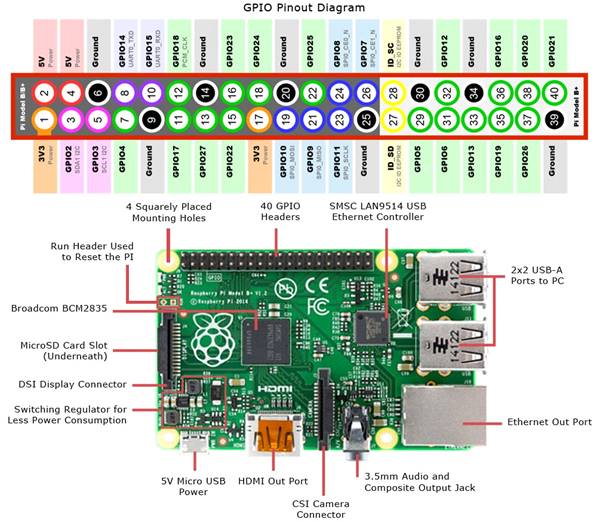
Here’s what you’ll typically find on a Raspberry Pi board:
1. USB Ports
Used for keyboards, mice, storage drives, and accessories. Newer models include USB 3.0 for faster transfers.
2. HDMI Output
Connect your Pi to a monitor or TV. Some models support dual displays.
3. Ethernet Port
For wired internet access.
4. Wi-Fi & Bluetooth
Built-in wireless connectivity on most modern models.
5. ARM Processor
Unlike traditional PCs (which use x86 processors), Raspberry Pi devices use ARM architecture. This makes them energy-efficient but means some desktop software isn’t compatible.
6. RAM
Older models started at 256MB. Modern versions offer up to 8GB, comparable to entry-level laptops.
7. microSD Card Slot
Acts as the primary storage device.
What Makes Raspberry Pi Unique?
Beyond standard PC components, Raspberry Pi boards include special hardware features:
GPIO Pins (General Purpose Input/Output)
These 40 pins allow you to connect electronic components like:
- LEDs
- Sensors
- Motors
- Buttons
- Robotics kits
This is what makes the Pi so popular in STEM education and DIY electronics.
Camera Interface
Connect a camera module for surveillance systems, time-lapse photography, or AI vision projects.
What Operating Systems Can You Install?
The default and most recommended system is Raspberry Pi OS, a Debian-based Linux distribution optimized for the hardware.
It comes with:
- A graphical desktop interface
- A web browser
- Programming tools
- Python pre-installed
It looks and feels similar to a lightweight desktop environment — beginner-friendly and stable.
But that’s just the beginning.
You can also install:
- Ubuntu
- Android
- Recalbox
- RetroPie
- LibreELEC
- OSMC
You can even experiment with Windows through community projects, though performance may be limited.
What Is a Raspberry Pi Used For?
The real magic of Raspberry Pi lies in its versatility.
Here are the most popular use cases in the U.S. and globally:
1. Learning to Code
The Raspberry Pi ecosystem strongly emphasizes education.
You can learn:
- Python
- Scratch
- Linux command line
- Basic networking
- Server management
It’s one of the most affordable ways to start programming.
2. Desktop Computer Replacement
Can a Raspberry Pi replace a PC?
For basic tasks like:
- Web browsing
- Word processing
- Streaming
- Social media
Yes — especially with the Raspberry Pi 5 (8GB model).
But it’s not built for:
- AAA gaming
- 4K video editing
- Heavy Adobe software
3. Home Server & Self-Hosting
One of the most popular advanced uses is running services like:
- File servers
- Media servers
- VPN servers
- Website hosting
- Cloud storage
- Home automation hubs
A Raspberry Pi runs 24/7 while consuming minimal electricity.
4. Retro Gaming Console
Install a gaming-focused OS and turn your Pi into a classic console emulator supporting:
- NES
- SNES
- PlayStation
- N64
- Sega systems
Perfect for building a DIY arcade.
5. Smart TV & Media Center
Using Kodi-based systems like LibreELEC or OSMC, you can:
- Stream Netflix
- Watch YouTube
- Play local media
- Build a full home theater setup
All for under $100 total cost.
6. Robotics & Electronics
Thanks to GPIO pins, you can:
- Build robots
- Create motion sensors
- Develop smart mirrors
- Automate lights
- Design IoT devices
This is where Raspberry Pi becomes more than just a computer.
How Much Does a Raspberry Pi Cost?
Base pricing typically starts around $35, though real-world prices fluctuate depending on availability and demand.
Example price ranges:
- Raspberry Pi Zero: ~$10–$15
- Raspberry Pi 4 (4GB): ~$55
- Raspberry Pi 5 (8GB): ~$75+
Keep in mind you may also need:
- Official power supply
- microSD card (32GB recommended minimum)
- micro-HDMI cable
- Case
- Optional cooling
Even fully equipped, it’s still cheaper than most entry-level PCs.
Is It Hard to Learn?
The biggest adjustment for beginners is getting comfortable with Linux.
But modern Raspberry Pi OS includes:
- A desktop interface
- App menus
- Mouse support
- Beginner-friendly software
If you can use Windows or macOS, you can learn Raspberry Pi.
The learning curve only becomes steep if you dive into:
- Robotics
- Advanced programming
- Server networking
- Linux system administration
But that’s optional.
Raspberry Pi vs. Traditional Computer
| Feature | Raspberry Pi | Traditional PC |
|---|---|---|
| Size | Credit-card sized | Large tower or laptop |
| Cost | $35–$75 | $400+ |
| Power Consumption | Extremely low | Moderate to high |
| Performance | Entry-level | Mid to high |
| Expandability | Limited | High |
For everyday light use and experimentation, Raspberry Pi offers unmatched value.
Can Raspberry Pi Replace Your Laptop?
In 2026, the Raspberry Pi 5 is closer than ever to replacing an entry-level computer.
If your daily tasks include:
- Browsing the web
- Watching videos
- Writing documents
- Email and Zoom meetings
Then yes — it’s viable.
If you need heavy multitasking or professional creative software, you’ll still want a traditional PC.
Final Thoughts: Is Raspberry Pi Worth It?
Absolutely.
The Raspberry Pi is one of the most affordable, flexible, and educational computing platforms available today. It bridges the gap between hobbyist electronics and real-world computing skills.
Whether you’re:
- A student learning to code
- A tech enthusiast building a home lab
- A parent introducing STEM concepts
- A DIYer experimenting with smart devices
- Or someone wanting a cheap mini PC
The Raspberry Pi delivers serious value for the price.
And once you start experimenting with it, you’ll quickly realize:
It’s not just a tiny computer — it’s a gateway to understanding how technology really works.
References
- Raspberry Pi Foundation – Official website and mission statement
https://www.raspberrypi.org - Raspberry Pi 5 – Official technical specifications
https://www.raspberrypi.com/products/raspberry-pi-5/ - Raspberry Pi 4 – Hardware documentation
https://www.raspberrypi.com/products/raspberry-pi-4-model-b/ - Raspberry Pi OS – Official operating system documentation
https://www.raspberrypi.com/software/ - Ubuntu for Raspberry Pi – Canonical documentation
https://ubuntu.com/download/raspberry-pi - RetroPie – Official project documentation
https://retropie.org.uk
And if you'd like to go a step further in supporting us, you can treat us to a virtual coffee ☕️. Thank you for your support ❤️!

We do not support or promote any form of piracy, copyright infringement, or illegal use of software, video content, or digital resources.
Any mention of third-party sites, tools, or platforms is purely for informational purposes. It is the responsibility of each reader to comply with the laws in their country, as well as the terms of use of the services mentioned.
We strongly encourage the use of legal, open-source, or official solutions in a responsible manner.
Comments